3D Print Order Management Dashboard

Printers Go Boom
Printers Go Boom (by Table Goes Boom) is the 3D printing dashboard that tracks every order, every plate, and every gram of filament, and helps you price every product properly, so you don't have to keep it all in your head. Built and used by the team at Table Goes Boom, it's changed our lives, and we think it'll change yours too!
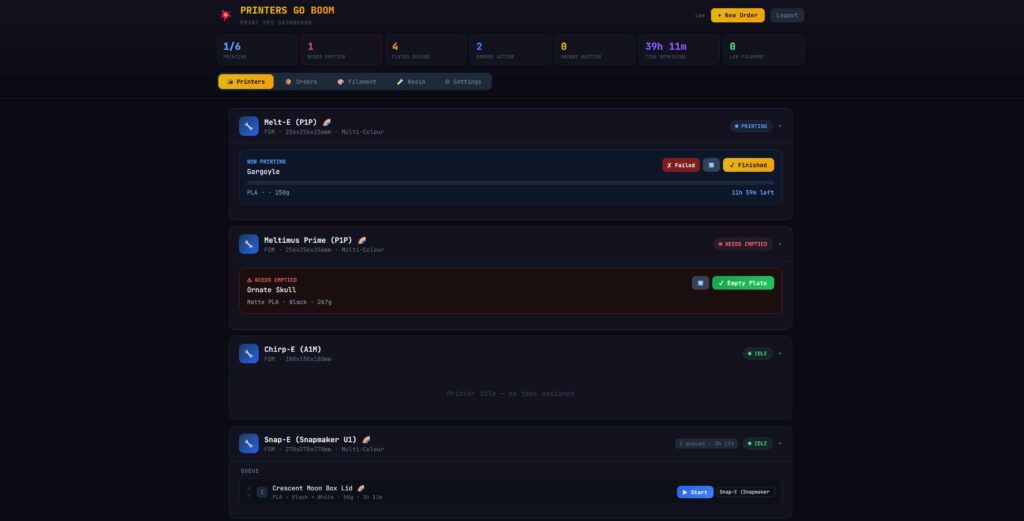
One Dashboard. Every Printer. Every Order. Every Spool.
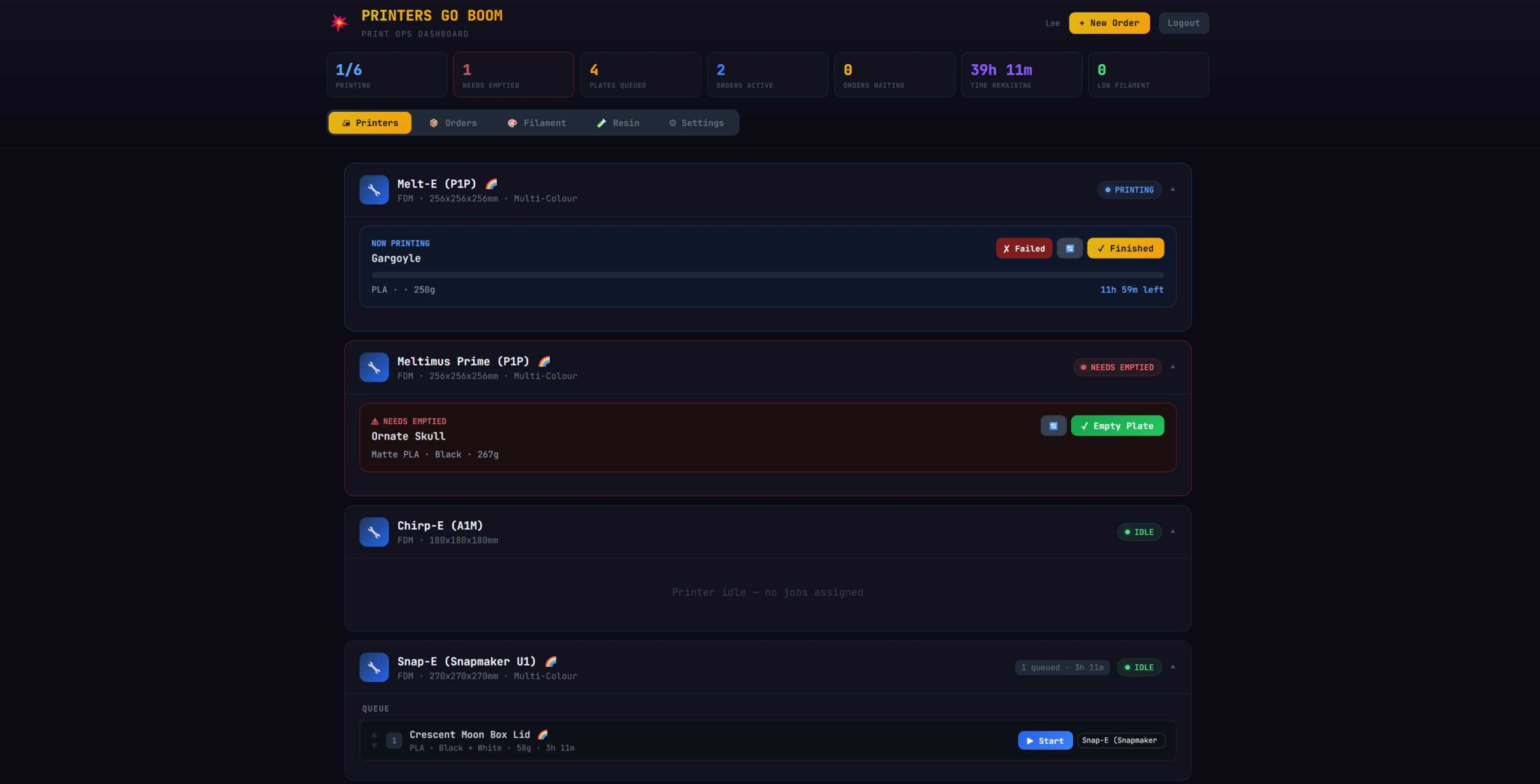
Printers Go Boom replaces all the sticky notes, spreadsheets, guesswork and crossed fingers that you've got enough filament to finish this next print! With a single real-time dashboard, you can see what's printing, what needs emptied, what's queued, and what's running low — at a glance.
Whether you're running two printers from your garage or twenty from a workshop, with hundreds of complex 3D print orders, PGB scales with you.
Key Features
Order Management
From Order to Shipped — Without the Spreadsheet
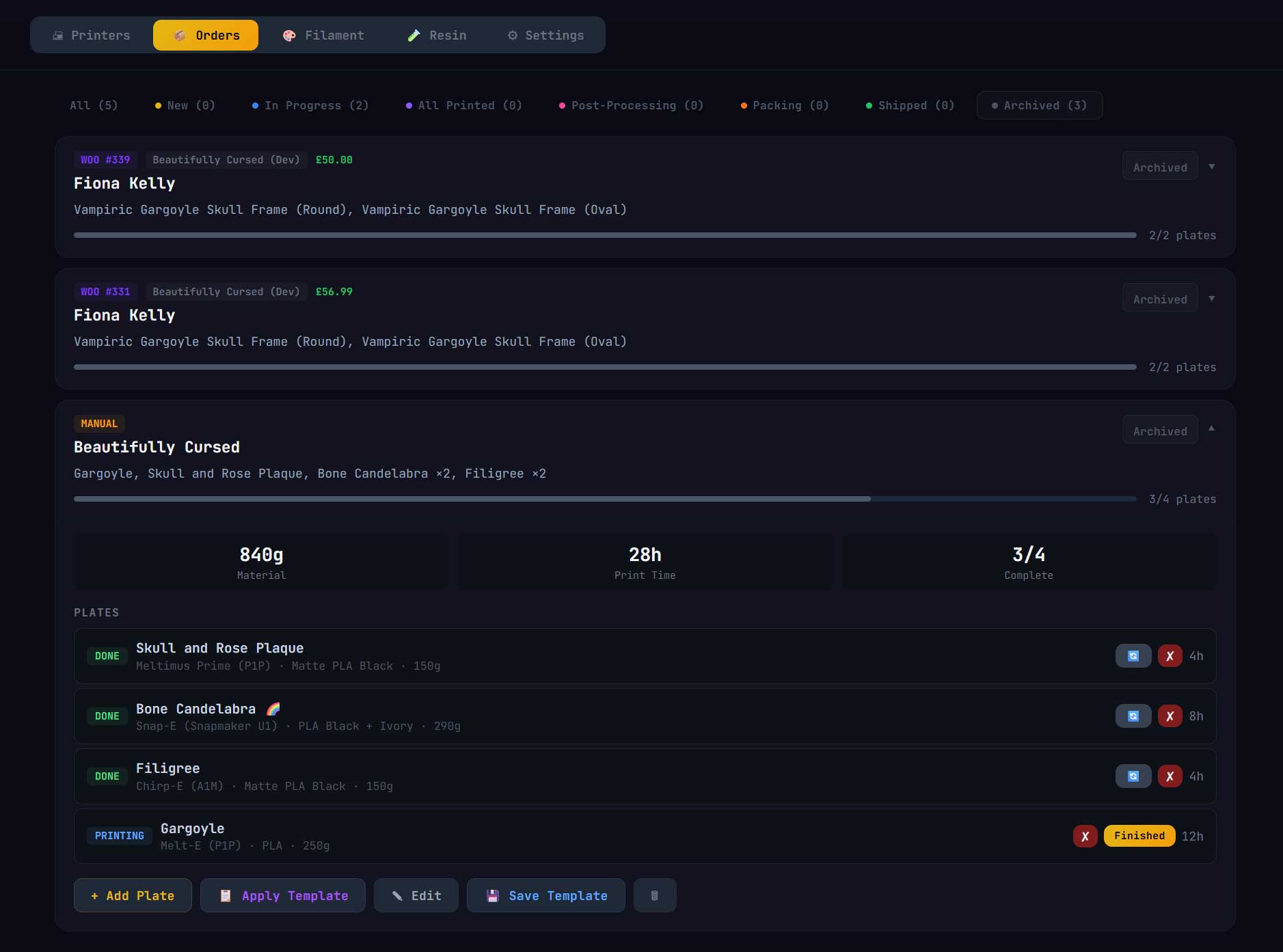
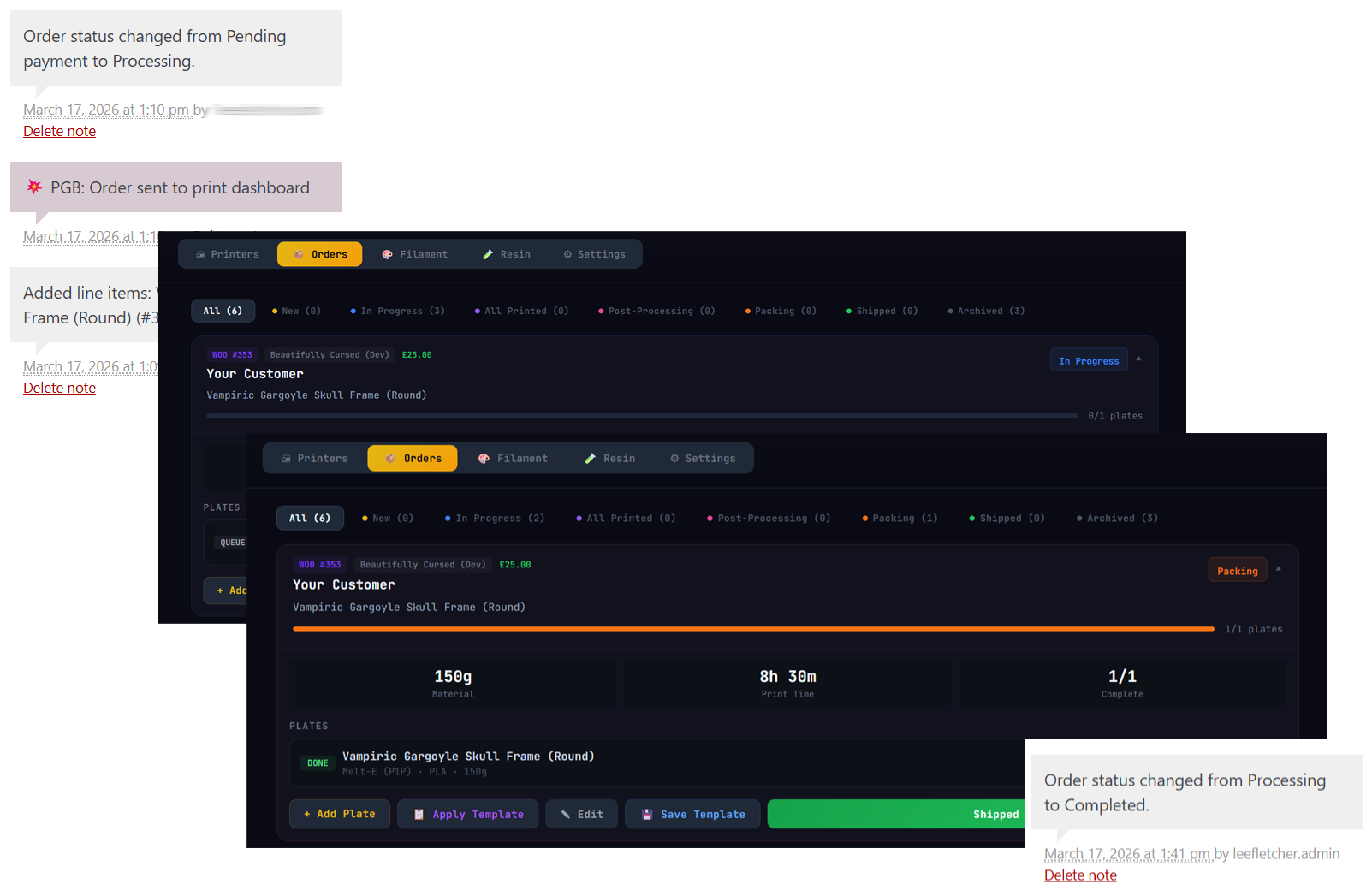
Every order flows through a clear pipeline: New → In Progress → All Printed → Post-Processing → Packing → Shipped. Add plates to each order, assign them to printers, and track progress automatically. When every plate is done, the order advances itself. No manual status updates. No forgetting where you are.
Drag plates into the order you want them printed, log failed prints with a reason so you can see what they cost you, and raise quotes and invoices straight from an order.
Printer Queue
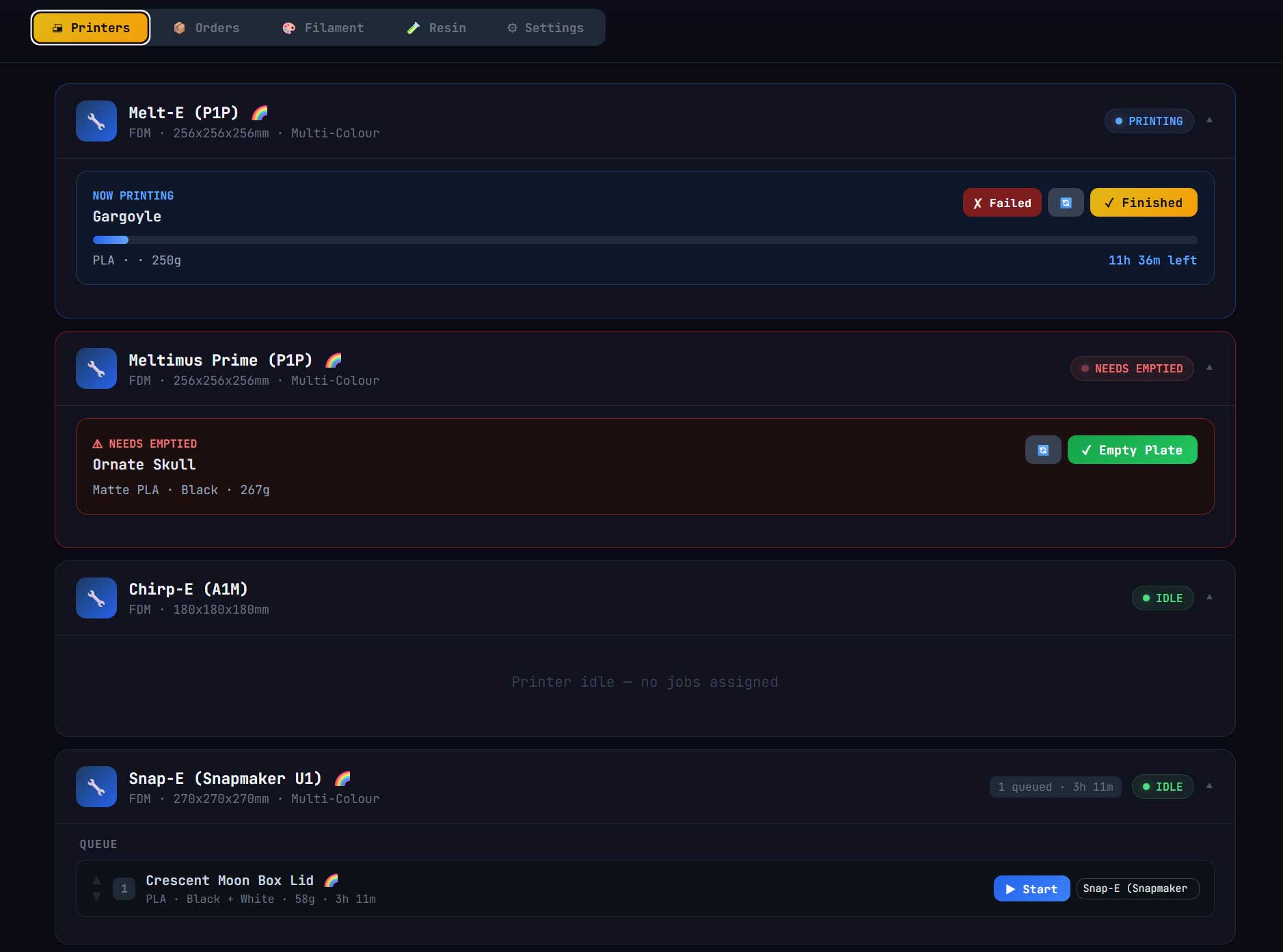
See Every Printer at a Glance
Your dashboard shows every printer in your farm with its current status – idle, printing, or needs emptied. Live progress bars show estimated completion, and queued plates line up ready to go. Resin plates get their own wash, dry and cure stages, so nothing gets forgotten after the print finishes.
The Farm Timeline looks further ahead. It projects every printer’s queue forward around the hours you’re actually in the workshop, so you can see when plates will really finish, and drag to reprioritise when plans change.
Filament & Resin Tracking
Know Exactly What's Left on Every Spool
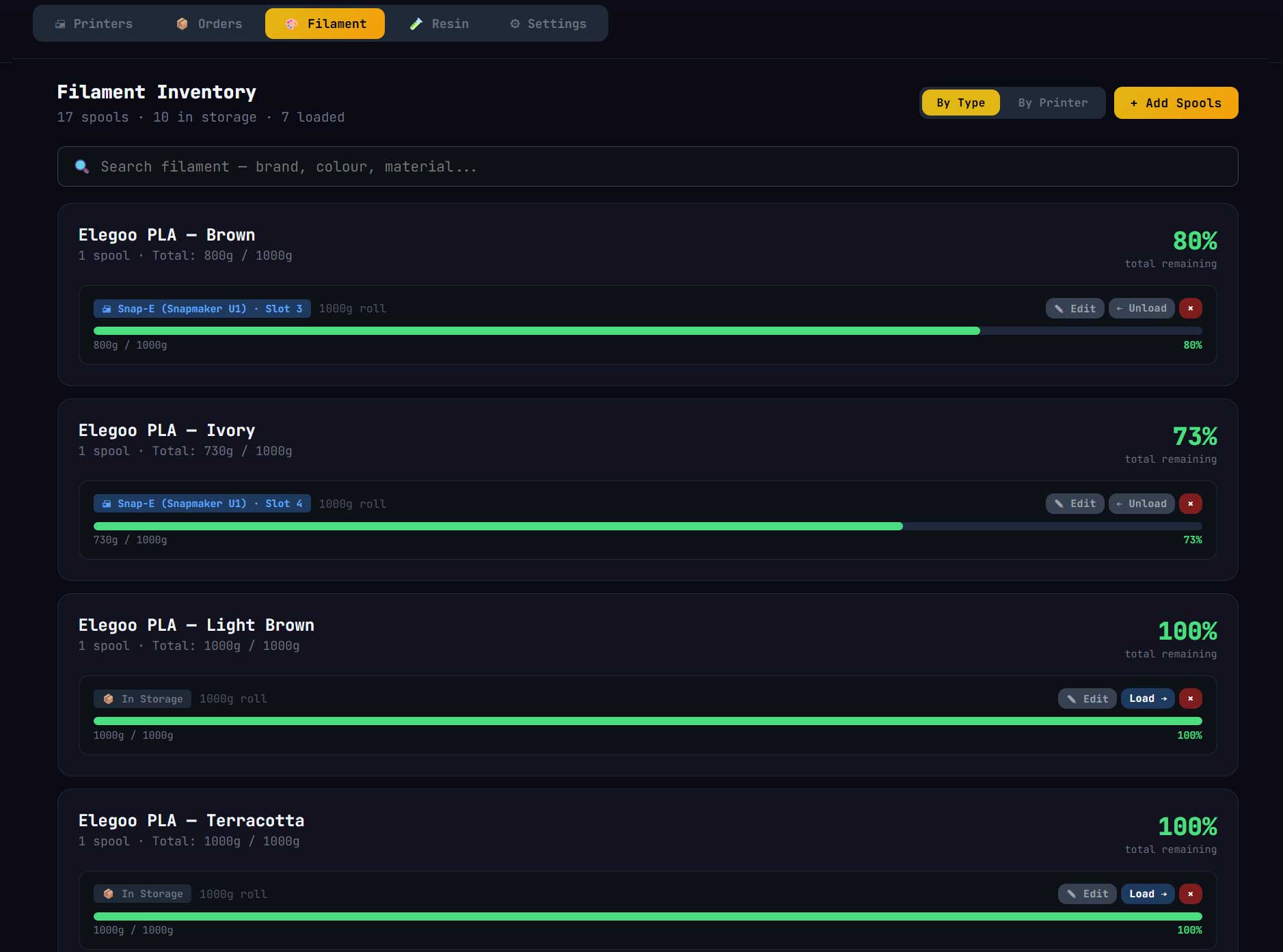
Track every spool of filament and every bottle of resin individually. See remaining amounts at a glance with colour-coded bars. Get low stock alerts before you run dry mid-print. Plan for future material usage. Assign consumables to printer slots and PGB auto-deducts usage as plates complete – including multi-spool AMS colour prints, and rollover spools of the same colour.
Store Connectors (Pro)
Orders From Your Shop Land Straight in Your Queue
Connect WooCommerce or FluentCart with our free WordPress plugin and paid orders appear in PGB automatically: customer name, line items, quantities and order value. When you mark an order shipped in Printers Go Boom, your store updates the order and your customer gets their shipping email. Selling other items alongside 3D prints on WooCommerce? Exclude categories or individual products so only printable items come through.
Running your own shop, or a platform we don’t have a plugin for? The custom store API lets any shop send signed orders straight into PGB, complete with links to product pages and files, and PGB tells your shop when each order ships.
Etsy order sync is in early access for Pro customers, with limited places while we finish testing. Get in touch if you’d like a spot.
Print Job Templates & 3MF Import
Same Product, Same Setup — One Click
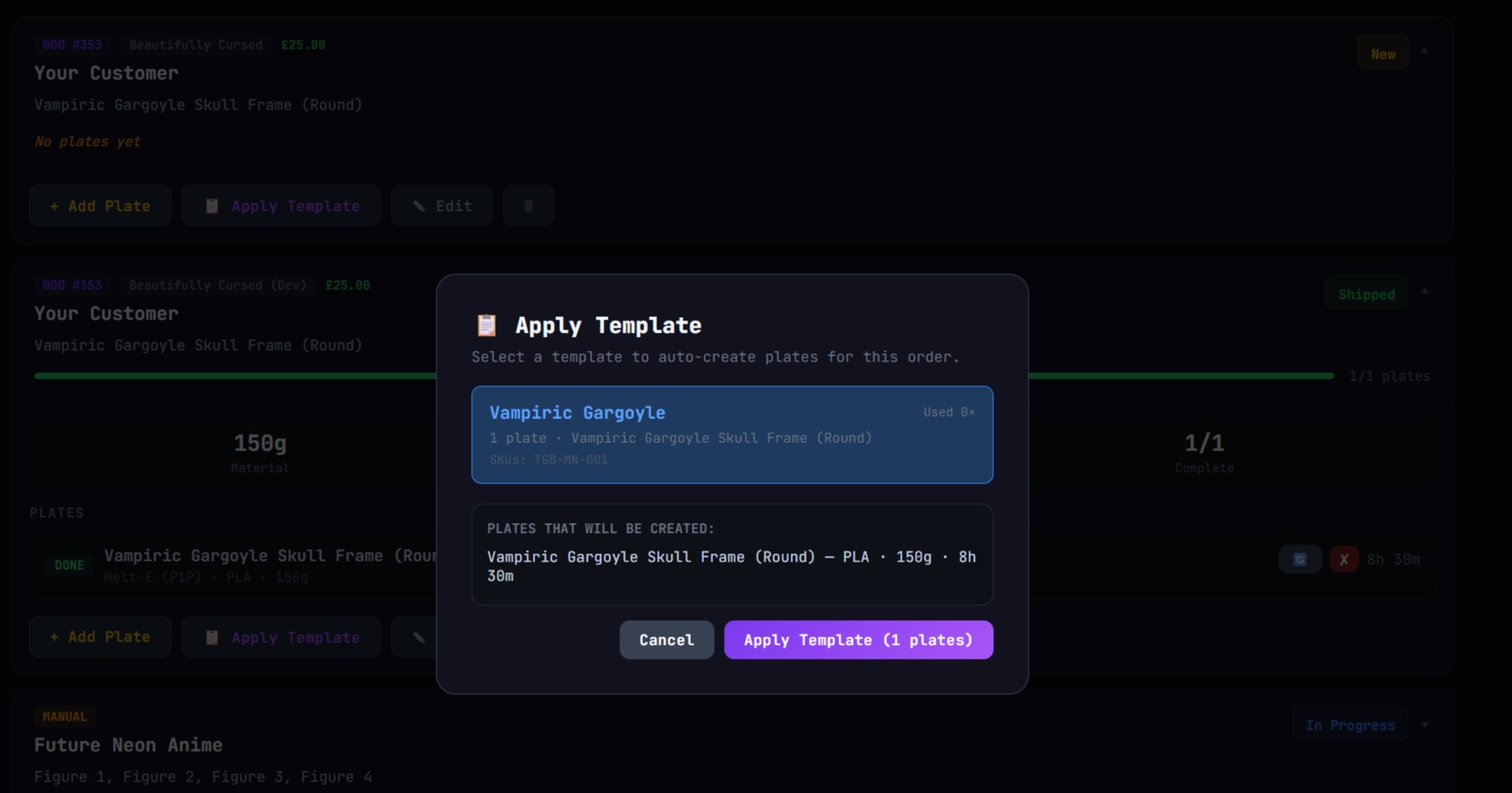
Selling the same item every week? Save the plate setup as a template: names, print times, materials, weights, everything captured. Next time that order comes in, hit Apply Template and all the plates are created instantly, with links to your 3MF files so you don’t have to hunt them down. Add SKUs to your templates and PGB will suggest the right one when a matching store order arrives.
Starting from scratch? Drop in a sliced Bambu Studio or OrcaSlicer project and PGB creates a plate for every bed, with print times, filament weights and thumbnails already filled in. You don’t upload anything to us, it’s all done in your browser.
Products & Pricing
Know What Every Print Costs, and What to Charge
Build your product catalogue in PGB, with variants for every size, colour and finish. The pricing calculator works out what each item really costs you (filament, electricity, your time and an allowance for failed prints) and shows your margin at whatever price you set. It keeps a price history too, so you can see what changed and when. The plate calculator does the maths for a full bed of one item: what the plate costs to print, what it sells for, and what you actually make.
Need listing copy? Add your own Claude API key and PGB drafts product descriptions for each sales channel from your product details and photo. Create entire product pages for pennies.
On Pro, your catalogue syncs both ways with FluentCart and WooCommerce: pull your products in, then push updated prices and descriptions back to your store.
Print Farm Team Ops (coming soon)
Managing a Team? No Problem!
We’re building team accounts next. Set up your manager account, then give each team member access to the part of the workflow that fits their role. You’ll get a central view of everything happening across the farm, plus Slack notifications and reporting set up to suit your operation.
Up and Running in Under 5 Minutes
Step 1:
Add Your Printers
Step 2:
Connect Your Store
Step 3:
Print, Track, Ship, Repeat
Built for Makers and 3D Print Sellers
For Hobbyists & 3D Print Stores
Manage plate queues across multiple printers for Etsy, WooCommerce, FluentCart and convention stock, and price every product properly.
Custom & On-Demand Print Services
Track client orders from submission to shipment with full plate-level visibility.
Small Batch Manufacturers
Production runs with repeatable templates, 3MF import, consumable tracking, and cost calculators that show your real margin.
Growing Print Farms
Unlimited printers, a Farm Timeline that plans around your working hours, and printer reports that show what failed prints really cost. Team accounts are on the way.
Don't Just Take our Word For It...
Some kind words from our beta users
“Changed our whole workflow and actually helped us organise the business and create easily manageable, and more importantly, scalable systems.”

Everything You Need to Succeed
Standard (limited time Founders price)
£29AnnuallyEverything you need to run your print farm and price your products properly. Ideal if you add orders by hand, from commissions and conventions to direct sales.
Unlimited FDM & Resin Printers
Order Pipeline, from New to Shipped
Farm Timeline & Printer Queue
Sliced 3MF Project Import
Print Job Templates
Filament and Resin Inventory
Product Catalogue with Variants
Cost & Plate Profit Calculators
AI Product Descriptions (Your Own Claude API Key)
Quotes, Invoices & Profit Reports
Pro (limited time Founders price)
£99AnnuallyFor sellers with an online shop. Orders flow in from your store automatically, shipped updates go back to your customers, and your catalogue stays in sync, so PGB becomes the hub of your whole operation.
Everything in Standard, plus...
WooCommerce & FluentCart Order Sync
Custom Store API: Connect Any Shop
Shipped Updates Sent Back to Your Store
Two-Way Product Sync with FluentCart
Etsy Order Sync (Early Access)
Coming Soon: Team Accounts & Slack Alerts
🔒 14-day money-back guarantee • Secure checkout • Currently available to UK customers
Please note: These are introductory prices only available whilst we’re in our launch period. Lock in your price today and keep today’s pricing until you cancel.
Frequently asked questions
Got a question? Hopefully it's answered here. If not, give us a shout, and we'll be happy to answer.
Contact usWhat types of printers does PGB support?
PGB works with any 3D printer — FDM, resin, or both. It doesn’t connect directly to your printers (yet), but it manages the workflow around them: organising orders into plates, tracking what’s queued on which printer, and monitoring your filament and resin stock. Whether you’re running a single Bambu X1C or a farm of fifty Ender 3s and all the resin printers, PGB handles it seamlessy.
Do I need an online store to use PGB?
Not at all. You can add orders manually, which is perfect if you take orders through social media, local markets, or word of mouth. The WooCommerce connector is there for when you’re ready to automate, and we’re working on Etsy integration too — so however you sell, PGB will meet you there.
What’s the difference between Standard and Pro?
The Standard tier gives you everything you need to manage your printers, plates, products, filament, and resin — with manual order entry.. Pro unlocks store order sync with WooCommerce and Fluentcart on WordPress sites, and priority access to upcoming pro features like Etsy integration and team accounts. If you’re running a side hustle with a couple of printers, Standard has you covered. If you’re scaling up or selling through an online store, Pro pays for itself.
Is my data safe? What if PGB goes down?
Your data is stored in a secure, private database and backed up [daily]. If anything goes wrong, we restore it from the latest backup.
If PGB is ever offline, your print farm keeps running. PGB doesn’t control your printers, so anything already printing carries on, and your shop keeps taking orders as normal. Your orders are always safe in WooCommerce, FluentCart or Etsy. When PGB comes back, Etsy orders catch up on their own, and any WooCommerce or FluentCart orders paid during the outage can be added in a few clicks.
You’re never locked in. If your subscription ends, your account goes read-only rather than disappearing, so you can still see everything. A full data export is on the way, so you’ll always be able to take your data with you. Further ahead, we’re planning a desktop version of PGB for anyone who’d rather keep everything on their own computer.
And we run our own print farm on PGB every day. If it goes down, we feel it too, and we fix it fast.
I’ve got printers in different locations — will PGB handle that?
Yes. PGB is a web app, so you can access it from anywhere. Set up your printers by location, queue jobs from your laptop at home, and your team (or you) can check what’s next to print from the workshop. No VPN or special setup required.
Do you support Etsy?
It’s actively in development and will be available on the Pro tier. If you sell on Etsy, sign up now and you’ll be among the first to use it when it launches.
What if I just sell at markets or take orders through Instagram?
PGB’s manual order entry is built exactly for this. Add a customer name, list the items, and start plating. You don’t need an online store to get value from PGB — if you’ve got a printer and a to-do list, we can make the whole process better.
Can multiple people use the same account?
Team accounts are coming soon on the Pro tier. You’ll be able to invite team members so one person can queue jobs from home while another runs the printers in the workshop. It’s on our near-term roadmap and Pro subscribers will get it first.
Request a Demo
If you have any questions, or are still unsure how it might fit into your daily workflow, drop us a question, or ask for a demo call using the form below.